
One Click Thematic Map Logo

One Click Thematic Map v2.0

Instant visualization for QGIS. Now with advanced classification, styling controls, and export tools.
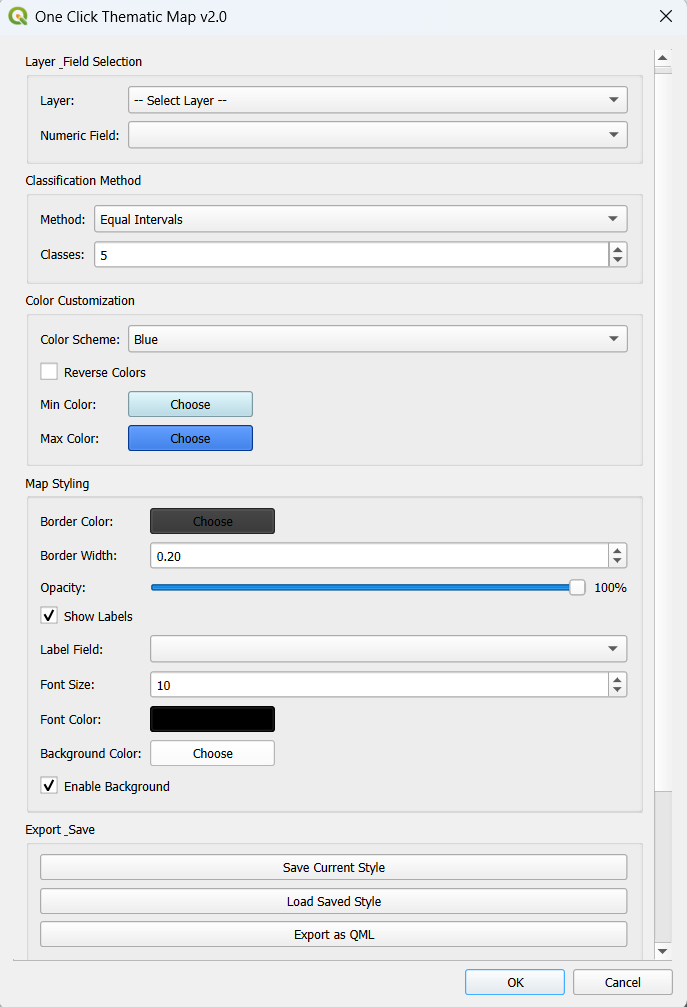
Version 2 Interface with Advanced Controls
New v2.0 Interface

Core Simplicity

The foundation that made v1 great is still here. Fast, reliable, and one-click simple.

Smart Detection

Automatically filters and detects layers with numeric fields. No more scrolling through unrelated text fields.

One Click Workflow

Select your field, pick a color, and click OK. The simplest workflow in the QGIS ecosystem.

Robust Handling

NULL values are handled safely, ensuring your map never crashes due to missing or corrupt data.

Pre-built Palettes

Pre-loaded with multiple professional color schemes (Reds, Blues, Spectral) for instant styling.

What's New in v2.0

We've added professional cartography tools without losing the simplicity.

New

5 Classification Methods

  • Equal Intervals
  • Quantiles (Equal Count)
  • Natural Breaks (Jenks)
  • Pretty Breaks
  • Standard Deviation
New

Advanced Colors

  • 8 Pre-built schemes
  • Custom Min/Max color picker
  • Smooth Gradient generation
  • Reverse Color option
New

Style Controls

  • Adjust Border width (0-5mm)
  • Border Color selection
  • Opacity Slider (0-100%)
  • 2-15 Classification classes
New

Label Customization

  • Label by any field
  • Font Size (6-32pt) & Color
  • Background Buffer toggle
  • Background Color picker
New

Live Statistics

Real-time data analysis panel.

  • Count, Min, Max
  • Mean, Median
  • Standard Deviation
  • Auto-updates on change
New

Save & Export

  • Save Style Presets (JSON)
  • Export Layer Style (.qml)
  • Auto-creates style folder
New

Legend Generator

  • Auto-generate in Print Layout
  • Opens layout designer
  • Compatible with all methods

How It Works

1

Load Layer

Open QGIS and load your vector/shapefile.

2

Open Plugin

Find the icon in the toolbar or Plugins menu.

3

Configure (New!)

Choose your classification method (Jenks, Quantile), adjust colors, and label settings.

4

Visualize

Click OK to generate the map instantly or export the style.

Installation

01 Download the ZIP file from the button above.
02 Open QGIS → Plugins → Manage and Install.
03 Select "Install from ZIP" tab.
04 Browse file & Click "Install Plugin".
05 Enjoy Advanced Thematic Mapping!